
Documentation menu
Data Transfer
Read the page as Markdown for LLMsSTAIR Data Transfer exports agents, toolsets and other records into a ZIP bundle and imports that bundle into another STAIR installation.
How Data Transfer works in STAIR
Use Data Transfer to move configuration between installations, for example from a test installation to production, or to keep a copy of a set of agents. The page is in the sidebar under System and is available to the Root, Admin and User roles.
- Export packs the records you select into a ZIP bundle. STAIR runs the export as a background job; when it is ready, you download the bundle from the job.
- Import takes a bundle exported from another STAIR installation. STAIR unpacks and validates it, resolves references against this installation and reports, record by record, what it created, skipped or could not import.
You can export these record types: Models, MCP instances, Toolsets, Skills, Agents, Workflows, MCP sources, Agent Evaluation, Schedules, Identity Providers and Secrets.
Secret values never leave STAIR in a bundle. The export replaces each credential value with a placeholder; for a JSON secret, only the values are replaced, so the keys stay visible. When an import updates an existing secret, STAIR keeps the value already stored. For a new secret, enter the real value after the import.
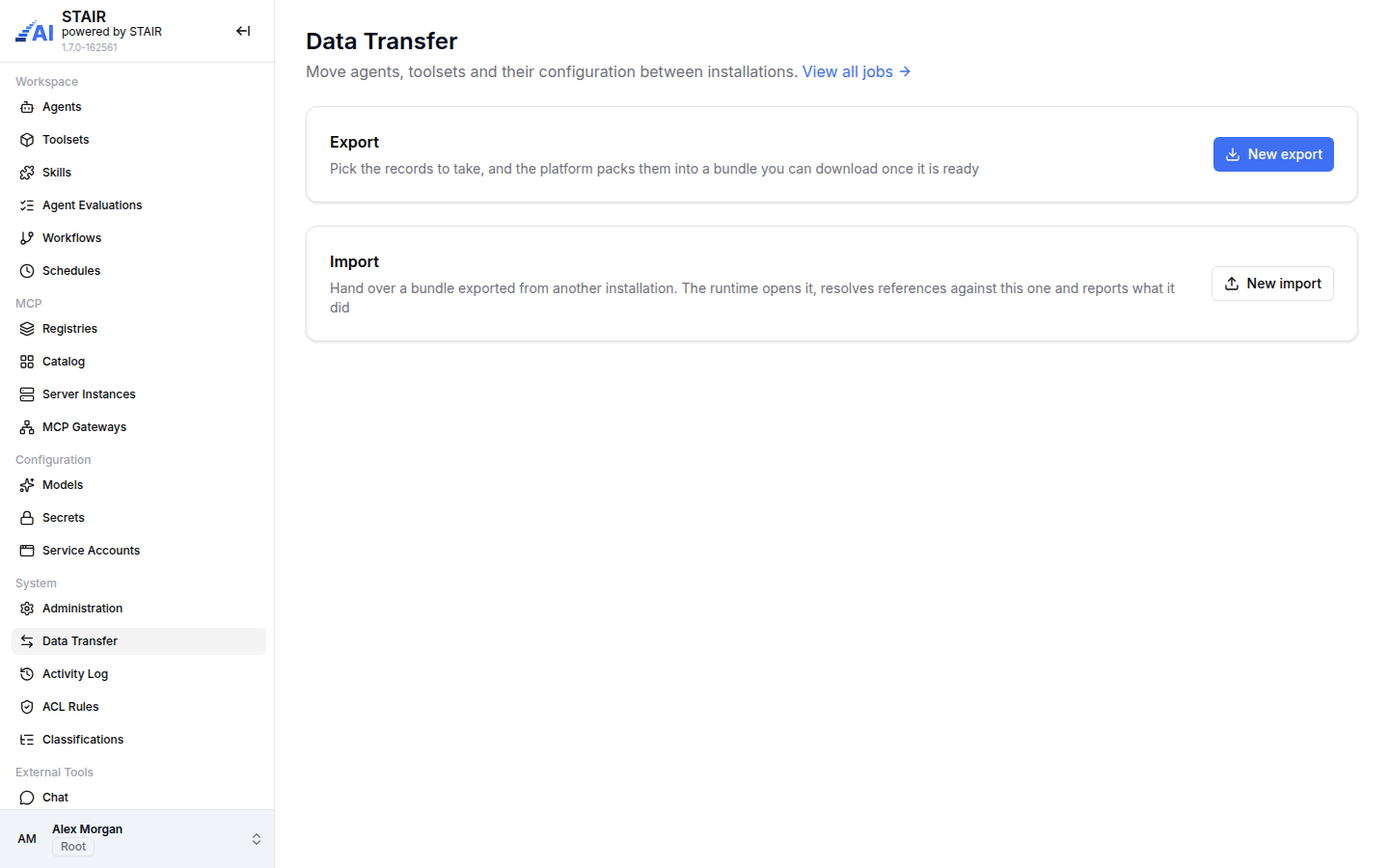
How to export records from STAIR
- In the sidebar, open Data Transfer.
- In the Export section, click New export.
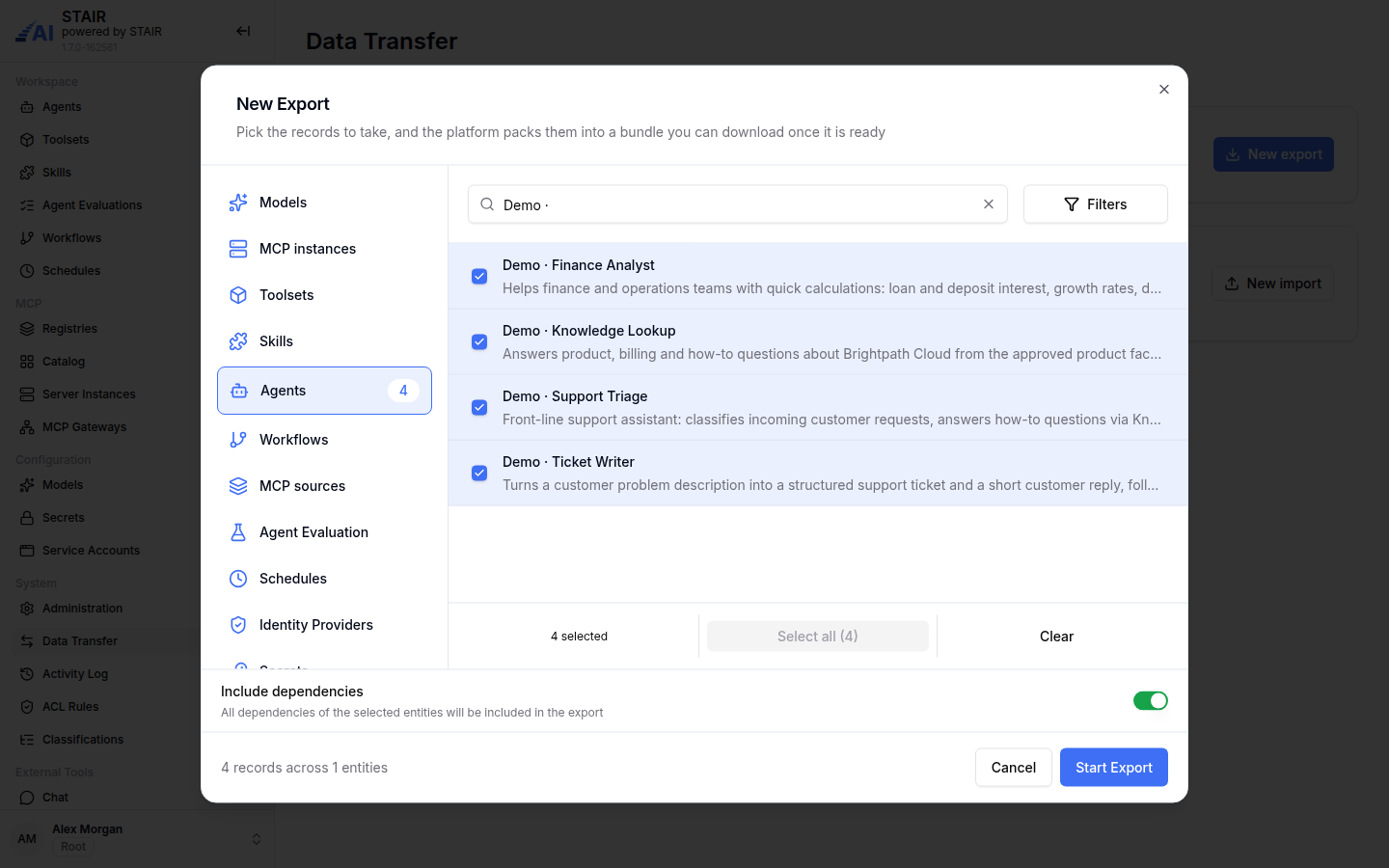
- In the New Export dialog, choose a record type on the left, for example Agents.
- Find the records: type in the search box or click Filters (the filters depend on the record type, for example status or classifications).
- Tick the records to export, or click Select all. The number next to the record type shows how many you selected. Repeat for other record types if needed.
- To take everything the selected records need, turn on Include dependencies. For an agent, this adds its model, sub-agents, toolsets and skills.
- Check the counter at the bottom, for example "4 records across 1 entities", and click Start Export.
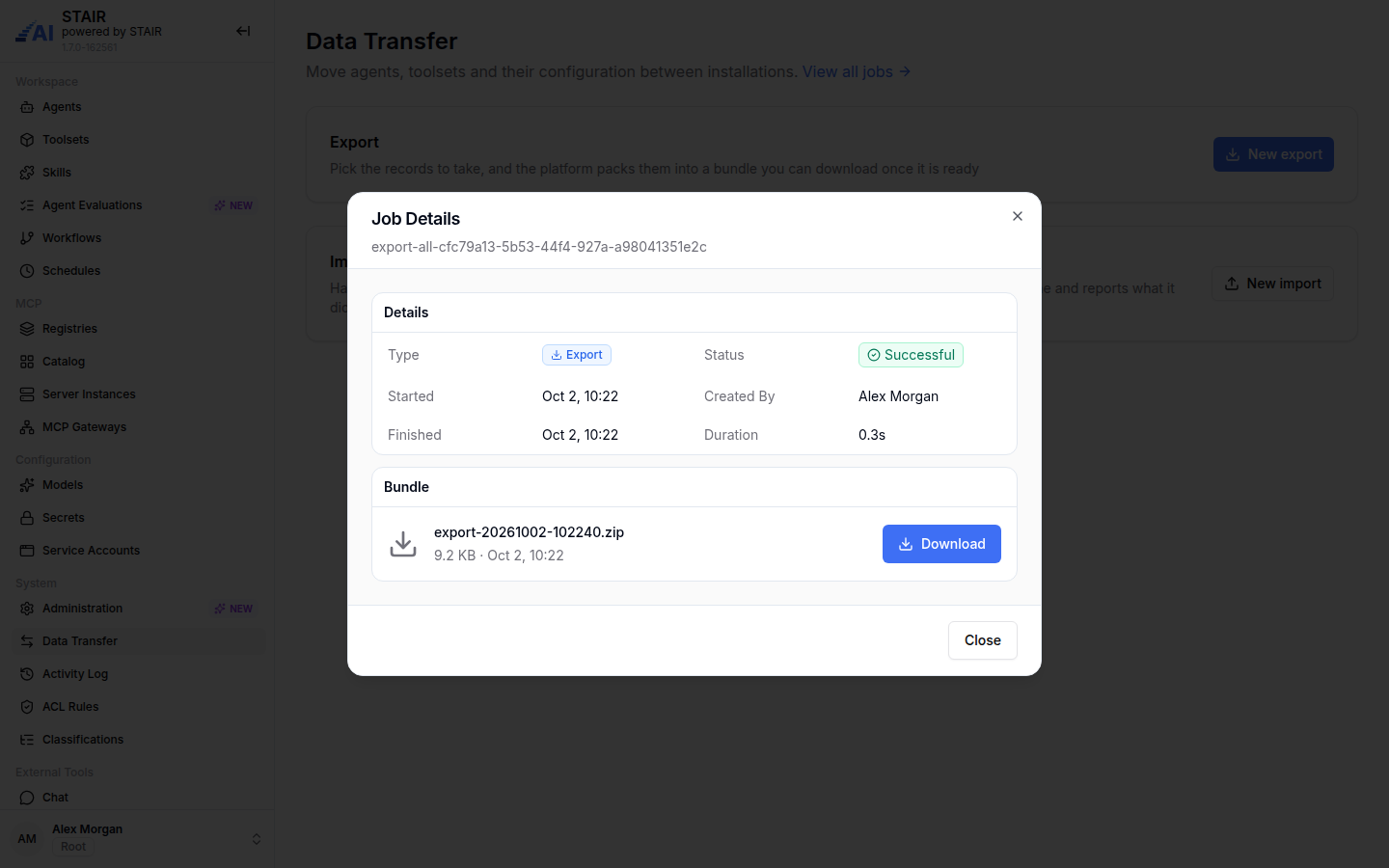
- In Job Details, wait until the status is Successful, then click Download under Bundle.
How to import a bundle into STAIR
- In the sidebar, open Data Transfer.
- In the Import section, click New import.
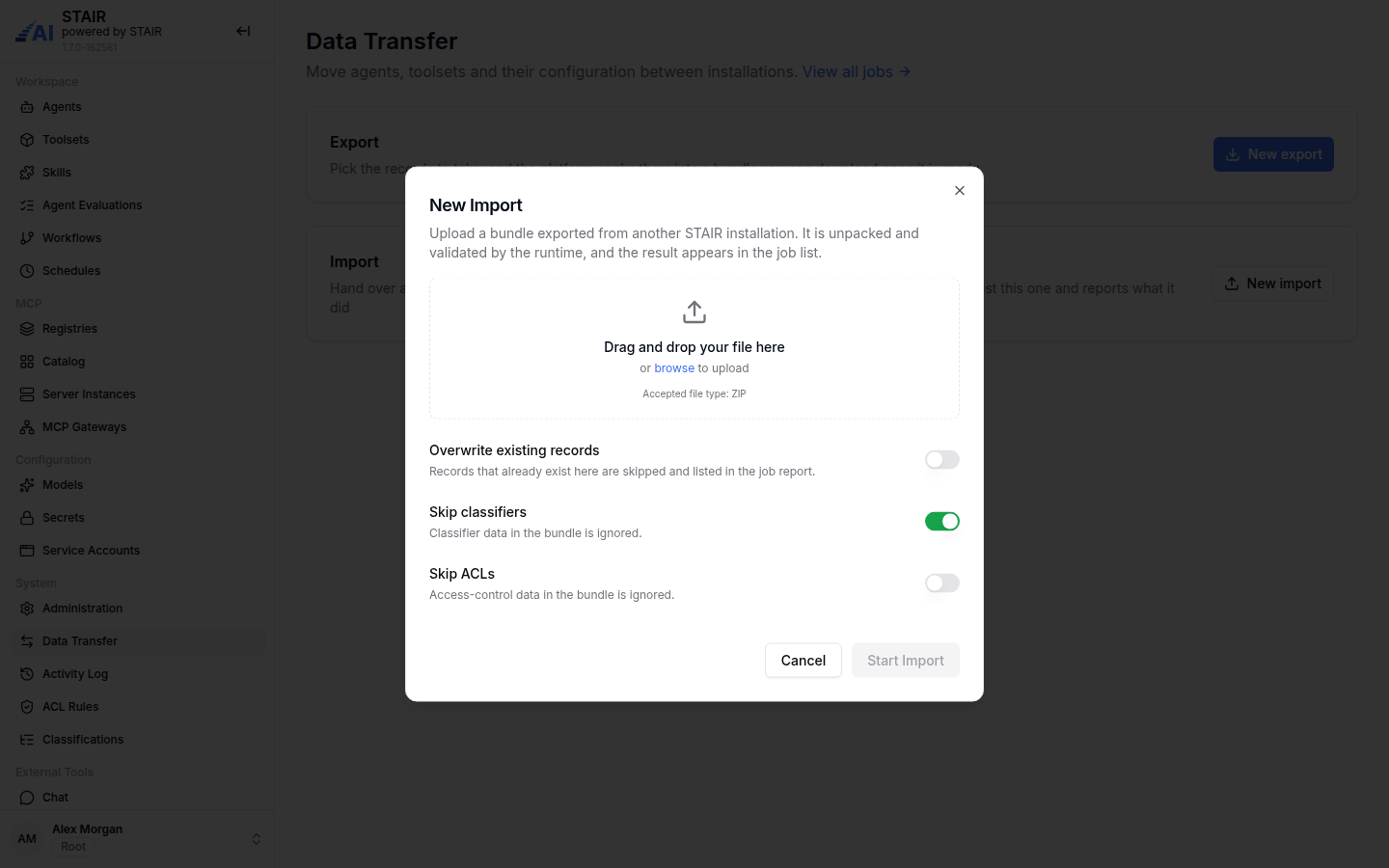
- Drag the ZIP bundle onto the drop zone, or click browse. Only ZIP files are accepted.
- Set the import options (see the reference below):
- Overwrite existing records: off by default, so records that already exist here are skipped and listed in the job report.
- Skip classifiers: on by default, so classification data in the bundle is ignored.
- Skip ACLs: off by default, so the access lists from the bundle are imported.
- Click Start Import.
- In Job Details, check the Result: Total records, Created, Skipped and Failed, and the status and error of each record.
- Fill in the values of new secrets, which arrive with a placeholder.
How to find past exports and imports in STAIR
Users with the Root or Admin role see the link View all jobs next to the Data Transfer title. It opens Administration → Jobs, where you filter by type Export or Import, open Job Details and download earlier bundles. See STAIR Administration.
Data Transfer settings reference
New Export
| Field | Required | Description |
|---|---|---|
| Record type list | Yes | Models, MCP instances, Toolsets, Skills, Agents, Workflows, MCP sources, Agent Evaluation, Schedules, Identity Providers, Secrets. Select records in one or more types |
| Search and Filters | No | Narrow the list of the current record type |
| Include dependencies | No | Adds every record that the selected records depend on. Off by default |
New Import
| Field | Required | Description |
|---|---|---|
| Bundle file | Yes | A ZIP bundle exported from a STAIR installation |
| Overwrite existing records | No | On: records that already exist here (same name) are updated from the bundle, if you have Write or Manage Access to them. Off (default): they are skipped and listed in the job report |
| Skip classifiers | No | On (default): classification data in the bundle is ignored. Without the Classifier role, classification data is always skipped |
| Skip ACLs | No | On: access-control data in the bundle is ignored. Off (default): access lists are imported |
Import result statuses
| Status | Meaning |
|---|---|
| Created / Imported | The record was added to this installation |
| Already exists | A record with the same name exists and was not overwritten |
| Skipped | The record was not imported, for example because of an import option |
| Failed | The record could not be imported; the Error column says why |
Troubleshooting
Data Transfer is missing from the sidebar
Cause: the page is available to the Root, Admin and User roles only. Fix: ask your STAIR administrator for the User or Admin role.
Records are listed as "Already exists" after an import
Cause: a record with the same name already exists, and Overwrite existing records was off or you have no Write or Manage Access to that record. Fix: import the bundle again with Overwrite existing records turned on, or ask the record's owner for Write Access, if you want the bundle's version.
Imported records reference a missing model or toolset
Cause: the bundle was exported without Include dependencies, and the target installation has no record with the referenced name. Fix: export again with Include dependencies on, or create the missing records first, then import again.
An imported model provider cannot connect
Cause: secrets in a bundle carry placeholders instead of values, and the secret did not exist in this installation before. Fix: open Configuration → Secrets and enter the real value of each new secret. See Secrets.
Classifications were not imported
Cause: Skip classifiers is on by default, and classification data is always skipped when the importing user lacks the Classifier role. Fix: have a user with the Classifier role import the bundle with Skip classifiers off.
FAQ
Does a STAIR export contain secret values?
No. Secret values are replaced with a placeholder in the bundle. After importing, enter the values of new secrets in Configuration → Secrets.
What does Include dependencies add to a STAIR export?
Every record the selected records rely on. For an agent, that is its model, sub-agents, toolsets and skills.
Does an import change records that already exist?
Only when Overwrite existing records is on and you have Write or Manage Access to the existing record. STAIR matches records by name; otherwise existing records are skipped and listed in the job report.
Who can use Data Transfer in STAIR?
Users with the Root, Admin or User role. The list of past jobs (View all jobs) is available to Root and Admin.
Is an export read-only?
Yes. An export only reads the selected records and creates a bundle; it changes nothing in the source installation.